Part 3 of the series: From Beginner Prompts to Projects — how everyday users are moving from single answers to finished work with AI.
For the past few years, people have been told that the secret to using ChatGPT is learning how to write a better prompt.
Add more detail.
Provide context.
Give ChatGPT a role.
Explain the tone you want.
Include an example.
Tell it exactly how to format the answer.
All of that can help.
But a new idea is beginning to change how people work with AI.
It is called looping.
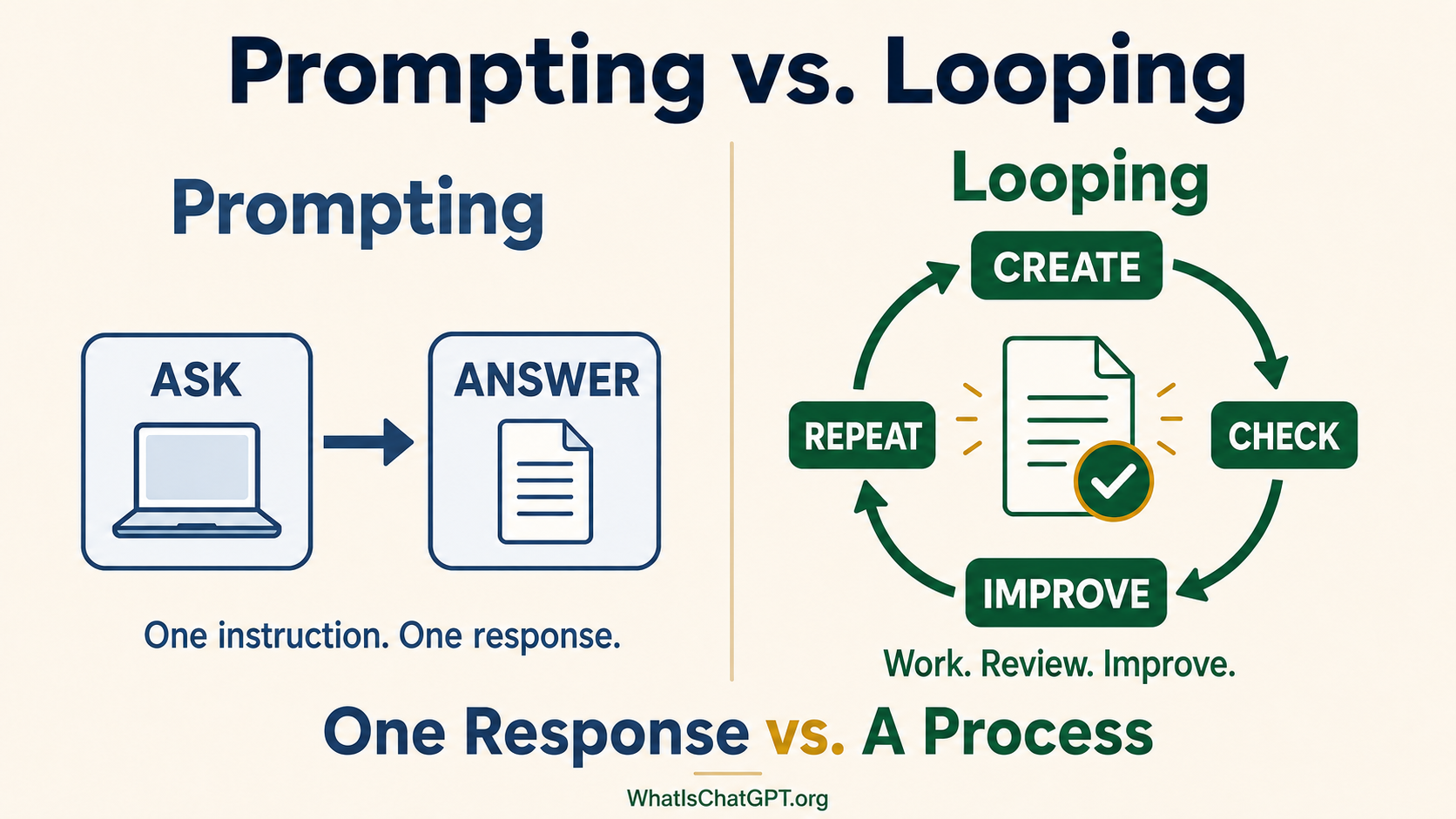
Instead of trying to write one perfect prompt and hoping ChatGPT produces the perfect answer, looping gives ChatGPT a process for doing the work, checking the result, and improving it.
The difference can be summarized like this:
Prompting improves the instruction. Looping improves the process.
This does not mean prompting is dead or no longer important.
A prompt still starts the work.
But for larger or more important assignments, your first prompt does not have to contain every possible instruction or produce the perfect result immediately.
You can create a loop that helps ChatGPT move from a first attempt toward a finished result.
What Is Prompting?
Prompting is giving an AI tool an instruction.
You might type:
“Write an email declining a meeting.”
ChatGPT writes the email, and the interaction could end there.
That is a prompt:
One instruction → One response
Prompting works well for clearly defined requests. You might ask ChatGPT to explain an unfamiliar term, rewrite a sentence, suggest a dinner idea, summarize a short passage, draft a short email, create a list of questions, convert measurements in a recipe, or suggest several titles for an article.
You do not need to build an elaborate system for every question you ask ChatGPT.
Sometimes one prompt is all you need.
The problem arises when people expect one prompt to produce a flawless final result for a complicated assignment.
A report may need fact-checking. A spreadsheet may need its formulas tested. A presentation may need to be reviewed for missing information. A personal dashboard may need its buttons and features checked. A travel plan may need to be checked against your budget, schedule, mobility needs, and current operating hours.
Real work usually involves more than producing a first draft. It involves creating, reviewing, correcting, and improving.
That is where looping enters the picture.
What Is Looping?
Looping means placing ChatGPT’s work inside a repeating process.
ChatGPT completes a step, observes or checks what happened, decides what needs to happen next, and continues.
The basic loop looks like this:
Do → Check → Improve → Repeat
The loop stops when the goal is reached, a limit is reached, or ChatGPT encounters a decision that requires you.
For example, instead of saying:
“Create a household dashboard.”
You might say:
“Create a household dashboard using the requirements below. When the first version is complete, check that every required section is included, test the interactive features, identify missing or confusing information, and correct any problems you find. Stop and ask me before making any decision involving private information or financial priorities. When the dashboard meets the requirements, give me the final version and tell me what I should review.”
ChatGPT now has more than an instruction to create something.
It has a process for checking and improving what it creates.
Why Are People Suddenly Talking About Looping?
I follow AI development across companies — not only OpenAI.
Some of the sharpest thinking about how to actually work with AI right now is coming out of Anthropic, the company that makes Claude.
In late June, at Meta’s @Scale conference, Boris Cherny — the creator of Anthropic’s Claude Code — was asked a direct question from the audience:
“Are loops the next hype cycle, or are they for real?”
His answer was immediate: “Yes, they’re for real.”
Then he explained why:
“Two years ago, we wrote source code by hand. We started to transition so agents write the code. And now we’re transitioning to the point where agents are prompting agents that then write the code. As big as the step from source code to agents was, loops are just as important and as big a step.” (TechCrunch’s report on the emergence of AI loops)
Most of that early conversation focused on software development.
But the underlying idea is not only for programmers.
Anyone who uses ChatGPT for research, writing, planning, organizing, creating files, or managing recurring work can benefit from understanding it.
The idea itself is not brand new. Recursive loops — the same kind of “keep going until a condition is met” pattern — have been part of computer science for decades. What is new is that AI tools have become capable enough to make looping useful to people who have never written a line of code.
In the past, the user had to manage every step of the process:
- Give ChatGPT an instruction.
- Read the response.
- Find the problem.
- Write another prompt.
- Read the revision.
- Test the result.
- Explain the next problem.
- Ask ChatGPT to try again.
The human was performing the loop manually.
Newer AI tools can handle more of that cycle themselves. They can use tools, inspect results, make revisions, and continue working until they reach an agreed stopping point.
That is the shift Cherny was pointing to.
And it is starting to matter for the rest of us, too.
You May Already Be Looping Without Knowing It
If you have ever had a conversation like this with ChatGPT, you have already participated in a simple loop:
You: Write a birthday invitation for my father.
ChatGPT: Here is a formal invitation.
You: This sounds too formal. Make it warmer and mention that he is turning 80.
ChatGPT: Here is a warmer version.
You: That is better, but shorten it and add the RSVP date.
ChatGPT: Here is the revised invitation.
You did not accept the first response as the final product.
You evaluated it, gave feedback, and asked ChatGPT to improve it.
That is a loop.
It looks like this:
ChatGPT creates → You review → You give feedback → ChatGPT revises
This is one of the best ways for beginners to use ChatGPT because it removes the pressure to write a perfect prompt.
You can begin with a reasonable request, look at what ChatGPT produces, and guide it toward what you actually want.
The newer development is that ChatGPT may be able to perform more of the checking and revising without waiting for you after every step.
That leads to two flavors of looping that everyday users should understand.
“Working With ChatGPT” vs “Letting ChatGPT Work”
There are two forms of looping — and the difference is really about how much you stay in the driver’s seat.
Working With ChatGPT
When you are working with ChatGPT, you stay actively involved in every cycle.
ChatGPT creates something. You review it. You explain what is missing or incorrect. ChatGPT revises it. You continue until you are satisfied.
This works well when your personal taste matters, the assignment involves emotion or judgment, you are still discovering what you want, you need to check each stage carefully, the consequences of a mistake are significant, or ChatGPT cannot independently verify the result.
Examples include writing a personal letter, choosing the tone of an important email, developing a brand voice, planning a meaningful family event, making a sensitive financial decision, discussing medical or legal information, or designing a room around your preferences.
Letting ChatGPT Work
When you let ChatGPT work, it performs more of the cycle itself.
It may examine the goal, develop a plan, complete a step, use a tool or inspect the result, compare the result with your requirements, correct a problem, continue to the next step, and stop when the assignment is complete or your judgment is needed.
This works well when the result can be checked against clear requirements.
Examples include confirming that every spreadsheet formula works, checking whether all required sections appear in a document, testing the buttons on an interactive dashboard, comparing information across several files, finding missing fields in a table, checking a presentation for inconsistent formatting, repeating the same analysis across multiple documents, or monitoring for a specific change.
The two approaches can also work together. ChatGPT can handle several cycles on its own and then bring the result to you for review.
How Looping Fits Into ChatGPT Work
ChatGPT Work makes looping much more practical.
In a traditional chat, ChatGPT may produce an answer and wait for your next prompt.
In Work mode, ChatGPT can be given a larger goal. It can gather information, make a plan, use tools, create deliverables, inspect its progress, and ask for your approval when necessary.
Suppose you ask ChatGPT Work to build a personal command center.
A prompting-only approach might be:
“Create a dashboard for my household, businesses, and personal projects.”
ChatGPT might create an attractive first version.
A looping approach would give ChatGPT a definition of success:
“Create a personal command center for my household, businesses, and personal projects. It must show today’s priorities, this week’s deadlines, overdue items, upcoming appointments, and projects that need a decision. After building it, test every interactive feature, check that information is displayed in the correct section, look for missing requirements, and improve the layout if anything important is difficult to find. Do not add private information I have not approved. Stop when the dashboard passes those checks, then show it to me for final review.”
You are no longer relying on the first attempt. You are asking ChatGPT to work toward a defined result.
(If you want the full plain-English tour of ChatGPT Work itself, my What Is ChatGPT Work guide walks through the whole mode from the beginning.)
Prompting Asks for an Output; Looping Defines “Done”
One of the most important parts of looping is deciding what “finished” means.
A vague request such as “make this better” gives ChatGPT very little guidance.
A useful loop includes a success condition.
Writing. The article is finished when it explains the subject in plain language, every factual claim has been checked, repetition has been removed, all sections support the main point, the introduction clearly tells the reader why the subject matters, and the article has been proofread.
Travel Planning. The itinerary is finished when every attraction is open on the planned day, travel times are realistic, the activities fit the stated mobility requirements, the total estimated cost remains within budget, meal options meet the traveler’s restrictions, and at least one backup plan is included.
Dashboard Creation. The dashboard is finished when every required category appears, important information is visible without unnecessary searching, buttons, filters, and links work, overdue and urgent items are easy to identify, private information is not exposed, and the user can understand how to update it.
A good loop does not tell ChatGPT to “keep trying.” It tells ChatGPT what it is trying to achieve.
A Simple Loop Any Beginner Can Use
You do not need technical language to start looping.
Try adding this to an ordinary request:
“Create a first version. Then review it against my requirements, identify anything missing or unclear, revise it, and give me the improved version. Tell me what you could not verify and what still needs my judgment.”
That one instruction introduces a basic loop:
Create → Review → Revise → Report
For an important project, you can be more specific:
“Before you begin, summarize what a successful result must include. Complete the assignment, check your work against those requirements, correct any problems you can safely correct, and stop to ask me about anything requiring personal judgment. Do not claim the work is complete until every requirement has been addressed.”
This does not guarantee perfection. But it gives ChatGPT a better process than producing one answer and stopping.
Everyday Examples of Looping
Looping may sound technical until you see how naturally it fits into everyday tasks.
Comparing Contractor Estimates
Instead of:
“Compare these estimates.”
Try:
“Compare these estimates by price, scope, materials, warranty, payment terms, exclusions, and completion time. Check each comparison against the original documents. If information is missing, mark it as missing rather than guessing. Review the completed comparison for inconsistencies, then create a final spreadsheet and a list of questions for each contractor.”
The loop is:
Extract → Compare → Verify → Correct → Present
Planning a Vacation
Instead of:
“Plan a weekend in New York.”
Try:
“Create an accessible weekend itinerary in New York using my dates, interests, hotel location, and mobility limitations. Check current operating hours, estimate travel times, confirm that the schedule is realistic, and verify that each major activity can accommodate my needs. If you cannot confirm accessibility, flag it instead of assuming. Revise any part of the itinerary that does not pass those checks.”
The loop is:
Plan → Research → Check → Adjust → Finalize
Organizing Important Documents
Instead of:
“Summarize these insurance documents.”
Try:
“Review these insurance documents and create a plain-language summary of coverage, exclusions, deductibles, deadlines, and required actions. Check every important statement against the original document and include the page or section where it appears. If two documents conflict, identify the conflict. Do not make legal conclusions.”
The loop is:
Read → Extract → Verify → Reconcile → Summarize
The Maker-Checker Approach
One useful form of looping separates creating from checking.
The maker produces the work. The checker reviews it against a clear standard.
For a simple assignment, ChatGPT may perform both roles:
“First create the spreadsheet. Then review it as a careful auditor and check every formula, total, and required field.”
For more complicated work, ChatGPT Work can divide the assignment into steps — creating the deliverable in one step and inspecting it in another.
This can be better than casually asking the same AI to say whether its own work is good.
However, a separate checking step is not automatically independent or infallible. AI systems may repeat the same mistaken assumption, overlook the same source, or confidently approve an incorrect result.
The maker-checker approach improves the process. It does not eliminate the need for human review.
The Problem With Asking AI to Check Its Own Homework
Looping has an obvious weakness:
The AI that made the mistake may not recognize the mistake.
ChatGPT might create an incorrect calculation and then tell you the calculation has been checked. It might use an unreliable source, review its own summary, and find nothing wrong. It might decide that a document meets your requirements because it misunderstood those requirements from the beginning.
That is why a strong loop should include some form of outside evidence whenever possible.
Instead of saying:
“Check whether your answer is correct.”
Ask it to reopen the original documents, recalculate the numbers using a different method, test the formulas, visit the current official source, compare the result with a checklist you supplied, mark anything it cannot verify, explain what evidence supports its conclusion, and ask you when the decision depends on preference or judgment.
The stronger question is not:
“Do you think you did a good job?”
It is:
“What evidence shows that each requirement was met?”
Always Give a Loop a Stopping Point
A loop should not continue forever.
Without a clear stopping condition, an AI agent may make unnecessary revisions, repeat work, consume more of your usage allowance, or keep changing something that was already good enough.
Useful stopping conditions include:
- Stop after every requirement passes the checklist.
- Stop after three revision cycles and report what remains unresolved.
- Stop if the same error occurs twice.
- Stop if the necessary information cannot be found.
- Stop before sending, purchasing, deleting, or publishing anything.
- Stop when a decision depends on my personal preference.
- Stop if the estimated cost exceeds the stated budget.
- Stop and ask before accessing a new file or connected service.
For example:
“Complete no more than three review cycles. If a problem remains after the third review, stop and explain the problem rather than continuing to revise.”
A stopping point protects your time, your information, and your available AI usage.
When You Should Stay in the Loop
Not every decision should be delegated to an automated process.
You should remain closely involved when the assignment includes medical decisions, legal interpretation, major financial consequences, hiring or firing, sensitive personal communication, private or confidential information, purchases or binding agreements, deleting files or records, publishing content in your name, or decisions involving your values, relationships, or reputation.
In those situations, ChatGPT can still help gather information, organize options, identify questions, or prepare a draft. But it should pause before taking an action or making the final decision.
The goal of looping is not to remove you from everything. It is to remove unnecessary repetition while keeping your judgment where it matters.
When One Prompt Is Better
Looping is powerful, but it is not always necessary.
Use one prompt when the question is simple, the result is low-risk, a rough answer is enough, you only need ideas, the task will take a few seconds, there is nothing meaningful to test or verify, or additional cycles would not improve the result.
You do not need a loop to ask “What can I substitute for buttermilk?”, “Give me five names for a book club.”, “Rewrite this sentence more warmly.”, or “What is the difference between a teaspoon and a tablespoon?”
More AI activity is not always better.
The right question is:
Would checking and revising materially improve this result?
If the answer is no, use a prompt and move on.
Prompting Is Not Dead
You may see people online claiming that prompting is dead.
That makes an exciting headline, but it is not quite accurate.
A loop still needs instructions. It needs a goal. It needs context. It needs access to the right information. It needs standards for checking the result. It needs boundaries. It needs a stopping condition.
Those instructions are prompts.
The difference is that the prompt is no longer expected to do all the work by itself.
Prompting starts and guides the work. Looping creates the process that carries it forward.
A poorly defined goal will not become clear because ChatGPT repeats it several times. Looping a bad instruction can produce the wrong result more efficiently. The quality of the goal, context, checks, and boundaries still matters.
(If you’d like a simple framework for writing clearer prompts to start any loop — my TEA formula for better answers is the place to begin.)
A Copy-and-Use Looping Template
Here is a beginner-friendly template you can adapt:
Goal: [Describe what you want accomplished.]
Information to use: [List the files, sources, requirements, or connected apps ChatGPT may use.]
Finished result: [Describe exactly what ChatGPT should create.]
Check the work for: [List facts, calculations, missing sections, formatting, functionality, tone, or other requirements.]
Improve: Correct any problems you can safely correct, then check the revised result again.
Stop and ask me if: [List decisions requiring your approval or judgment.]
Do not: [List actions ChatGPT may not take, such as sending, purchasing, publishing, deleting, or sharing.]
Stopping point: Stop when every requirement has been addressed, or after [number] review cycles. Report anything that remains uncertain or unverified.
You do not need to use every line for every assignment. The purpose is to help you think beyond the first response.
The New Skill Is Learning to Design the Process
Prompt engineering taught people to ask:
“How do I word this perfectly?”
Looping encourages a different set of questions: What am I trying to accomplish? What information does ChatGPT need? What should the finished result include? How can the work be checked? What should happen if a problem is found? Which decisions still require me? When should the process stop?
Those questions are useful whether you are creating a report, organizing your home, researching a purchase, planning a trip, or building a personal dashboard.
You do not need to become a programmer. You do not need to create a complicated automated system. And you do not need to stop using ordinary prompts.
Start with a change:
Ask ChatGPT to create, check, improve, and tell you what still needs your judgment.
That is the beginning of looping.
And it may be far more useful than spending hours trying to write the perfect prompt.
💡 Michelle’s Tip: Pick one thing on your to-do list right now that has been sitting for days because it feels too big. Try this once: describe the goal, list what should be true when it’s finished, and ask ChatGPT to work on it, check its work, and tell you what needs your judgment. See what comes back. That is your first loop.
Know Someone Still Struggling With ChatGPT?
Share my Free Quick-Start Guide with them.
It’s a plain-English walkthrough — the gentle first step that helps someone finally stop feeling behind.
Continue Learning with WhatIsChatGPT.org
If this article was helpful, grab the free Quick-Start Guide — a plain-English walkthrough delivered right to your inbox.
You may also enjoy What Is ChatGPT Work and How to Get Better Answers From ChatGPT.
Next in this Section — More From “From Beginner Prompts to Projects”
- What Is ChatGPT Work? — the beginner’s guide to OpenAI’s new mode for turning ideas into finished work
- ChatGPT vs. Claude: Why I Use Both — a direct comparison of the two most powerful AI assistants right now
- How to Get Better Answers From ChatGPT — the TEA formula for stronger prompts inside any loop