
By Michelle Avery
Have you ever asked ChatGPT a question and thought…
“Well… that wasn’t very helpful.”
If so, you’re not alone.
One of the biggest misconceptions about ChatGPT is that some people are naturally “good at prompting” while everyone else is left wondering what they’re doing wrong.
The truth is much simpler.
Most of the time, the difference between an average answer and an excellent one — the difference between mediocre and better answers from ChatGPT — isn’t that someone knows secret AI tricks. It’s that they know how to communicate what they’re really trying to accomplish. (If you’d like ready-to-use starter prompts, my full Best ChatGPT Prompts for Beginners guide pairs beautifully with this one.)
Think about it this way.
If you walked into a doctor’s office and said, “I don’t feel good,” your doctor would probably ask several follow-up questions before making any recommendations.
Where does it hurt? How long has this been going on? Have you had a fever? Are you taking any medications?
The more information they have, the more helpful they can be.
ChatGPT works much the same way.
It isn’t reading your mind. It’s reading your words.
Once you understand that, getting better answers becomes much easier.
In this guide, I’ll show you the simple formula I use to get consistently better results from ChatGPT — whether you’re a complete beginner or someone who’s been using AI for months.
The TEA Formula for Better Answers From ChatGPT
If you only remember one thing from this article, remember this:
Give ChatGPT the TEA.
No, not the kind you drink.
Think of TEA as a simple recipe for better conversations with ChatGPT.
T = Tell ChatGPT what you’re trying to do.
E = Explain the situation.
A = Ask — for what you need, and for what ChatGPT needs from you.
That’s it.
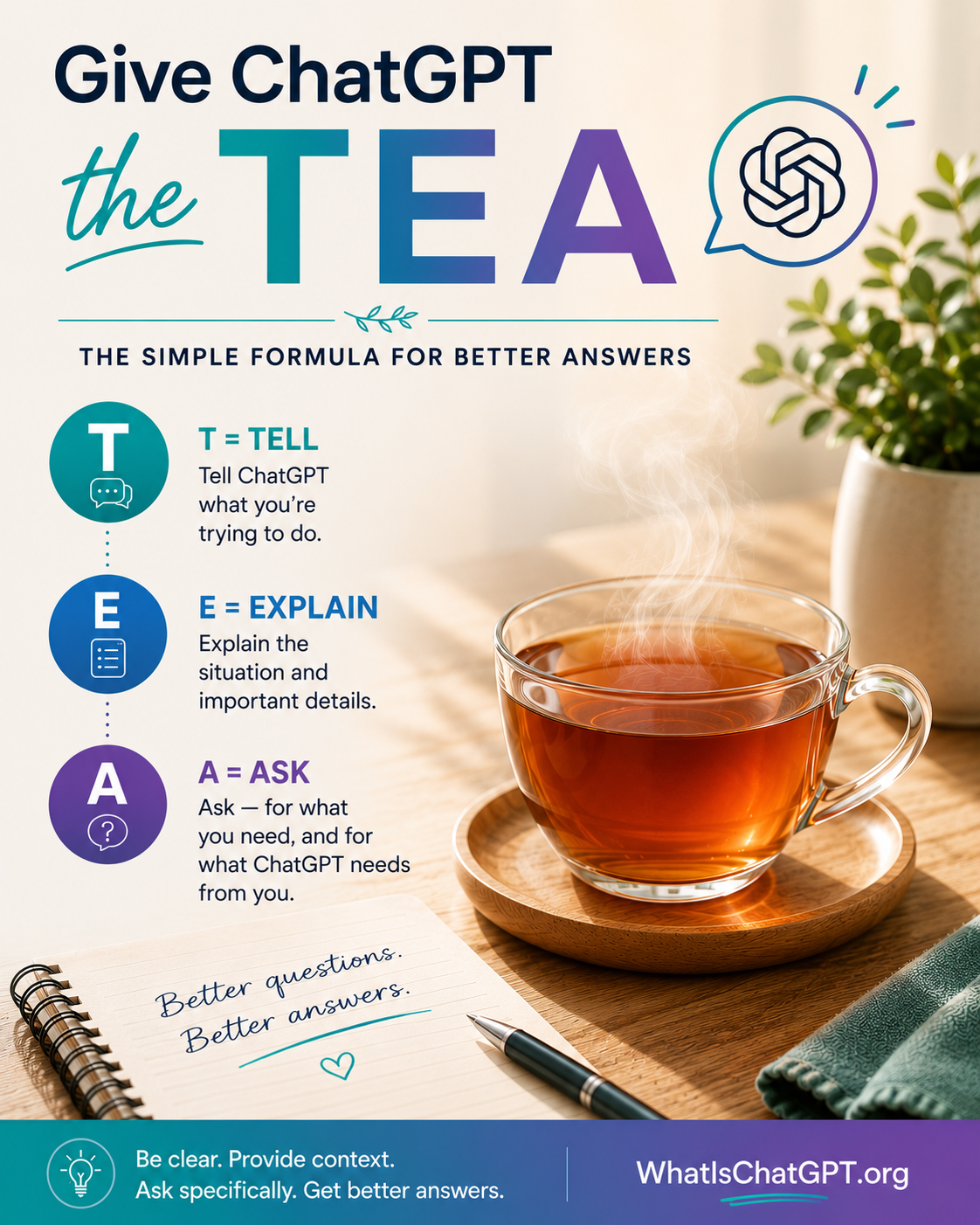
💡 Michelle’s Tip: You don’t have to memorize this formula. Just remember to give ChatGPT enough context to actually help. TEA is shorthand for that habit — nothing more.
Let’s look at each step.
T = Tell ChatGPT What You’re Trying to Do
Start with your goal. What are you trying to accomplish?
Instead of typing: Vacation
Try: I’m planning a family vacation.
Instead of: Resume
Try: I’m updating my resume because I’m applying for management positions.
Instead of: Dinner ideas
Try: I need quick dinner ideas for a family of four that can be made in under 30 minutes.
Notice the difference?
You’re giving ChatGPT a destination before asking it to provide directions.
E = Explain the Situation
This is where most people accidentally leave out the information that matters most.
Imagine someone asked you: “Can you recommend a good restaurant?”
You’d probably have a few questions. What city? How many people? Any food allergies? What’s your budget?
ChatGPT has those same questions — it just doesn’t always ask them.
That’s why context is so important.
For example, instead of saying: Help me write a speech.
Try saying: I need to write a five-minute retirement speech for my father. I want it to be warm, funny, and heartfelt without becoming overly emotional.
Now ChatGPT has something to work with. Context turns a generic answer into a personalized one.
A = Ask (in Both Directions)
Here’s where most beginners stop too early. Asking is actually a two-way street.
First, ask for what you need. Don’t assume ChatGPT knows what kind of answer you’re hoping for. Be specific.
Instead of: Tell me about Italy.
Try: I’m visiting Italy for the first time. Can you recommend a 10-day itinerary that focuses on food, history, and smaller towns instead of large cities?
Or instead of: Explain inflation.
Try: Can you explain inflation as if you’re teaching a curious twelve-year-old?
Little details like these often make a dramatic difference in the quality of the response.
Then, ask ChatGPT what it needs from you. This is the move that changes everything.
Try this: “Before you answer, ask me the 3 or 4 questions that would help you do this well.”
ChatGPT will turn around and interview you. Answer its questions. Then ask for the finished piece — or the perfect prompt — based on what you told it.
This one habit takes almost no effort and dramatically improves the quality of what you get back. When you invite ChatGPT to ask questions, you stop guessing at the perfect prompt and start having the perfect conversation instead.
Think of ChatGPT Like a New Assistant
Here’s an example I use all the time.
Imagine you hired a personal assistant today.
You walk into their office and say: “Vacation.”
They’d probably look at you with a puzzled expression.
Instead, you’d naturally say something like: “I’d like to take my family to Maine this October. We love seafood, scenic drives, and quiet places. We have about $4,000 to spend. Can you help me plan a five-day itinerary?”
You didn’t use a complicated formula. You gave them enough information to succeed.
ChatGPT works exactly the same way. The clearer you are, the more helpful it can be.
Here’s the Secret Most People Don’t Know
This might surprise you.
The best prompt is rarely your first prompt.
Many beginners believe experienced ChatGPT users sit down and write one perfect prompt that produces the perfect answer.
That’s almost never what happens.
Instead… they have a conversation. They clarify. They refine. They answer questions. They make adjustments.
The final prompt often comes much later.
That’s one of the biggest mindset shifts you can make.
Don’t think of ChatGPT as a vending machine where you insert one prompt and expect the perfect answer.
Think of it as a conversation with a very knowledgeable assistant. (If the basics of that conversation still feel new, my step-by-step How to Use ChatGPT tutorial walks through it slowly.)
My Favorite Way to Create Great Prompts
This is one of the techniques I use most often.
Instead of trying to write the perfect prompt from the beginning, I start talking with ChatGPT.
I explain what I’m trying to accomplish. I answer its questions. I react to its ideas. I explain what I like. I explain what I don’t like.
Sometimes we go back and forth for ten or fifteen minutes.
Only after we’ve explored the idea together do I ask something like: “Based on everything we’ve discussed, can you write the best possible prompt for this project?”
Because ChatGPT has been following the conversation, it already understands my goals, my preferences, and the outcome I’m trying to achieve.
The prompt it creates is often far better than anything I would have written at the beginning.
Then I read it. I make a few adjustments. And I save it for future use.
Ironically, one of the best ways to write a great prompt is to let ChatGPT help you write it.
Don’t Be Afraid to Keep Talking
One of ChatGPT’s greatest strengths is that it remembers the current conversation.
Let’s say you’re planning a birthday party. You might start by asking for theme ideas. Then ask for decorations. Then ask for menu suggestions. Then ask for games. Then ask for invitation wording.
You’re building on the same conversation instead of starting over every time.
That’s exactly how many experienced users work. Each answer becomes the starting point for the next question.
Better Questions Lead to Better Answers
Here are a few examples.
Instead of: Write me a blog post.
Try: Write a beginner-friendly blog post about organizing a pantry. Keep the tone warm and encouraging, and include practical tips that don’t require buying expensive organizers.
Instead of: Help with my resume.
Try: I’m applying for an operations manager position after ten years in customer service. Can you help me rewrite my experience to highlight leadership and problem-solving skills?
Instead of: Give me recipes.
Try: I have chicken, broccoli, rice, and shredded cheese. Can you suggest three easy dinners using only those ingredients? (For dozens more real-life examples of what ChatGPT can help with, see What Can ChatGPT Do?)
Notice what changed? Not the complexity. The clarity.
One More Trick: Show, Don’t Tell
Here’s a small habit that makes an enormous difference.
Instead of describing the tone or style you want with adjectives, show ChatGPT an example.
Instead of: Write a friendly welcome email.
Try: Here’s a welcome email I love: [paste it]. Can you write one for my new subscribers in this same tone?
Instead of: Write a professional bio.
Try: Here’s a bio I think is beautifully written: [paste it]. Can you write mine in this style, using the details below?
Examples are more powerful than adjectives.
When you show ChatGPT what “friendly” or “warm” or “professional” looks like to you, it can match that voice much more accurately than if it has to guess from words alone.
You can use this trick with almost anything — writing, formatting, structure, even the style of a checklist or outline. Whenever you can paste an example of what you want, do it.
Common Mistakes Beginners Make
Here are a few habits that can lead to disappointing answers:
- Asking very broad questions with little context.
- Expecting ChatGPT to know details you haven’t shared.
- Trying to get everything in one enormous prompt.
- Starting a brand-new conversation when the current one already contains helpful context.
- Giving up after the first answer instead of asking follow-up questions.
Fortunately, all of these are easy to fix.
The Goal Isn’t a Perfect Prompt
If you remember nothing else from this article, remember this:
Don’t try to write the perfect prompt.
Try to have the first conversation.
That’s how better prompts are created.
Every question helps ChatGPT understand you a little better. Every clarification helps it move closer to the answer you’re looking for.
Prompting isn’t about learning secret AI commands. It’s about learning how to communicate clearly.
And that’s a skill you’ll use far beyond ChatGPT.
Frequently Asked Questions
Do I need to learn prompt engineering?
No. You don’t need to become a prompt engineer to get excellent results. Learning to communicate clearly will take you much further than memorizing complicated formulas.
Is a longer prompt always better?
No. A clear prompt is better than a long prompt. Include the information that matters, but don’t add details that have nothing to do with your goal.
Can I ask ChatGPT to improve my prompt?
Absolutely. In fact, it’s one of the smartest ways to use ChatGPT. Describe what you’re trying to accomplish, have a conversation, and then ask ChatGPT to write a polished prompt based on everything you’ve discussed.
Michelle’s Thoughts
When people tell me they aren’t getting good answers from ChatGPT, my first question usually isn’t, “What prompt did you use?”
It’s: “What were you really trying to accomplish?”
Once you know the answer to that question, you’re already halfway to writing a better prompt.
So the next time you’re tempted to type just a few words into ChatGPT, pause for a moment.
Give it the TEA.
Tell it your goal. Explain your situation. Ask for exactly what you need.
You might be surprised by how much better the conversation becomes.
Continue Learning with WhatIsChatGPT.org
If this article was helpful, grab the free Quick-Start Guide — a plain-English walkthrough delivered right to your inbox.
You may also enjoy Best ChatGPT Prompts for Beginners and How to Use ChatGPT.
Next in this Section
- Best ChatGPT Prompts for Beginners — 75+ ready-to-use starter prompts to try today.
- How to Use ChatGPT — the step-by-step tutorial that pairs with this guide.
- What Can ChatGPT Do? — 50+ everyday uses to spark ideas for your own conversations.