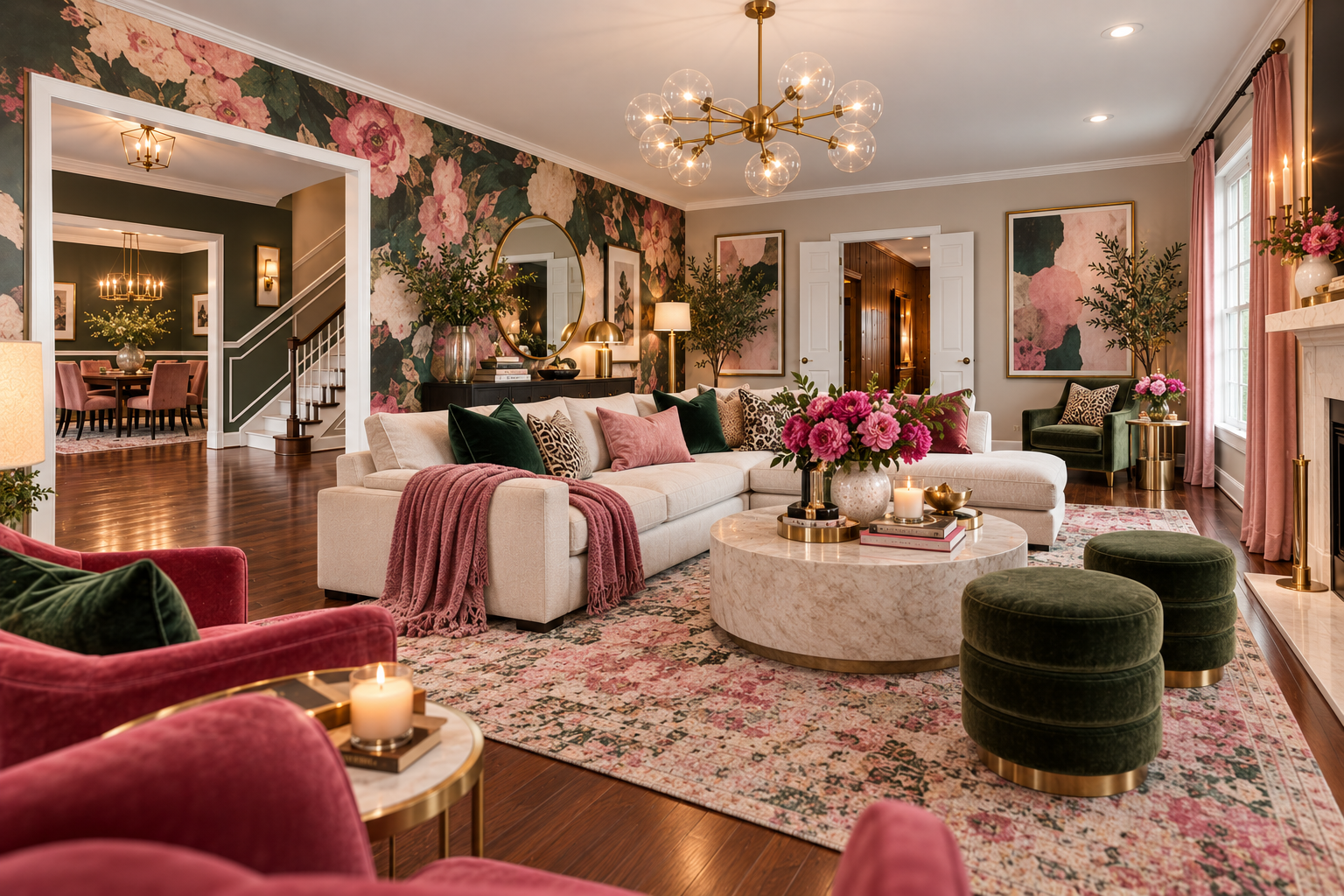
One of my favorite things to do with ChatGPT has absolutely nothing to do with writing.
I show it a room.
More specifically, I upload a photograph of a room exactly as it looks now and ask ChatGPT to show me what that same space could look like in a completely different style.
And this is where AI starts to feel a little bit magical.
I recently used this photograph of an empty living room:
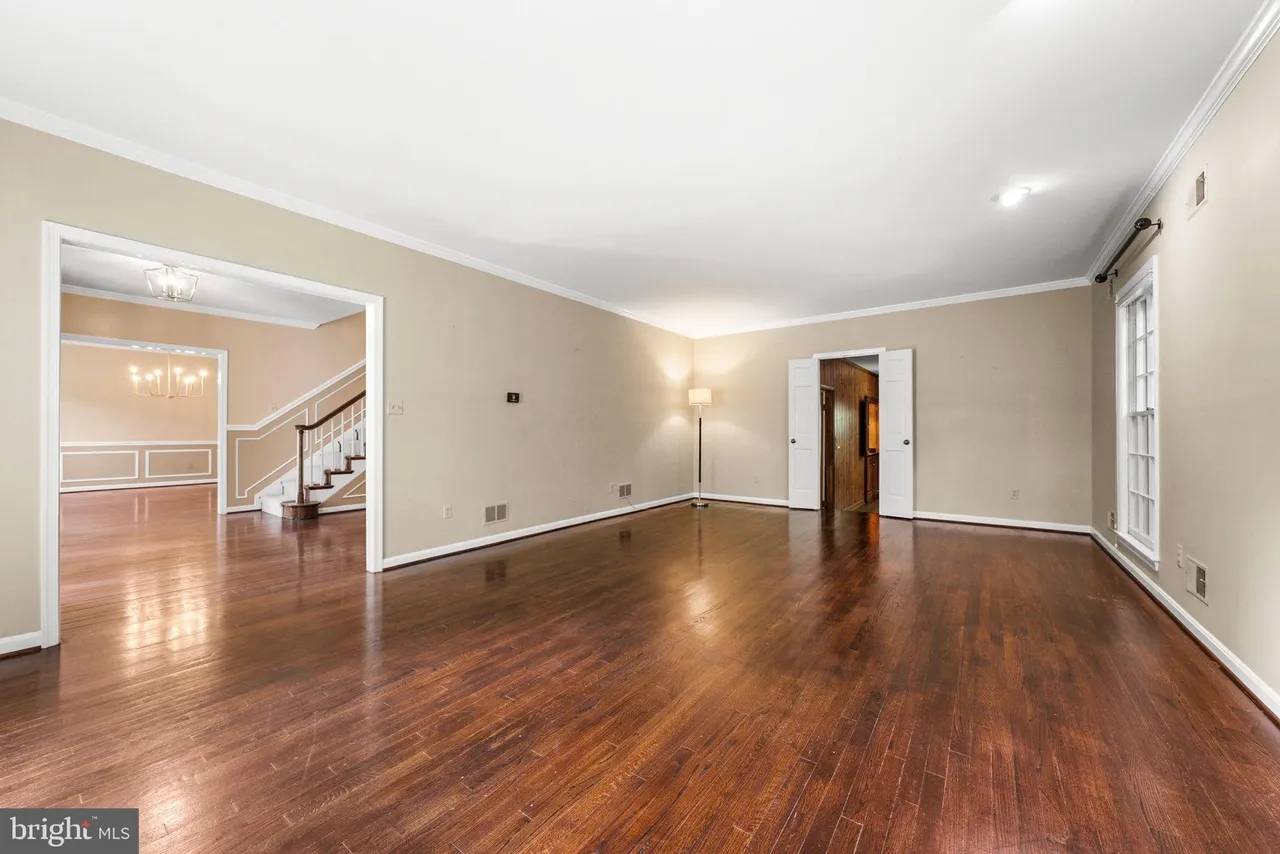
Then I asked ChatGPT to transform it into a glamorous floral luxe living room — rich botanical patterns, jewel tones, layered textures, and unapologetically feminine details.
This is what it gave me:
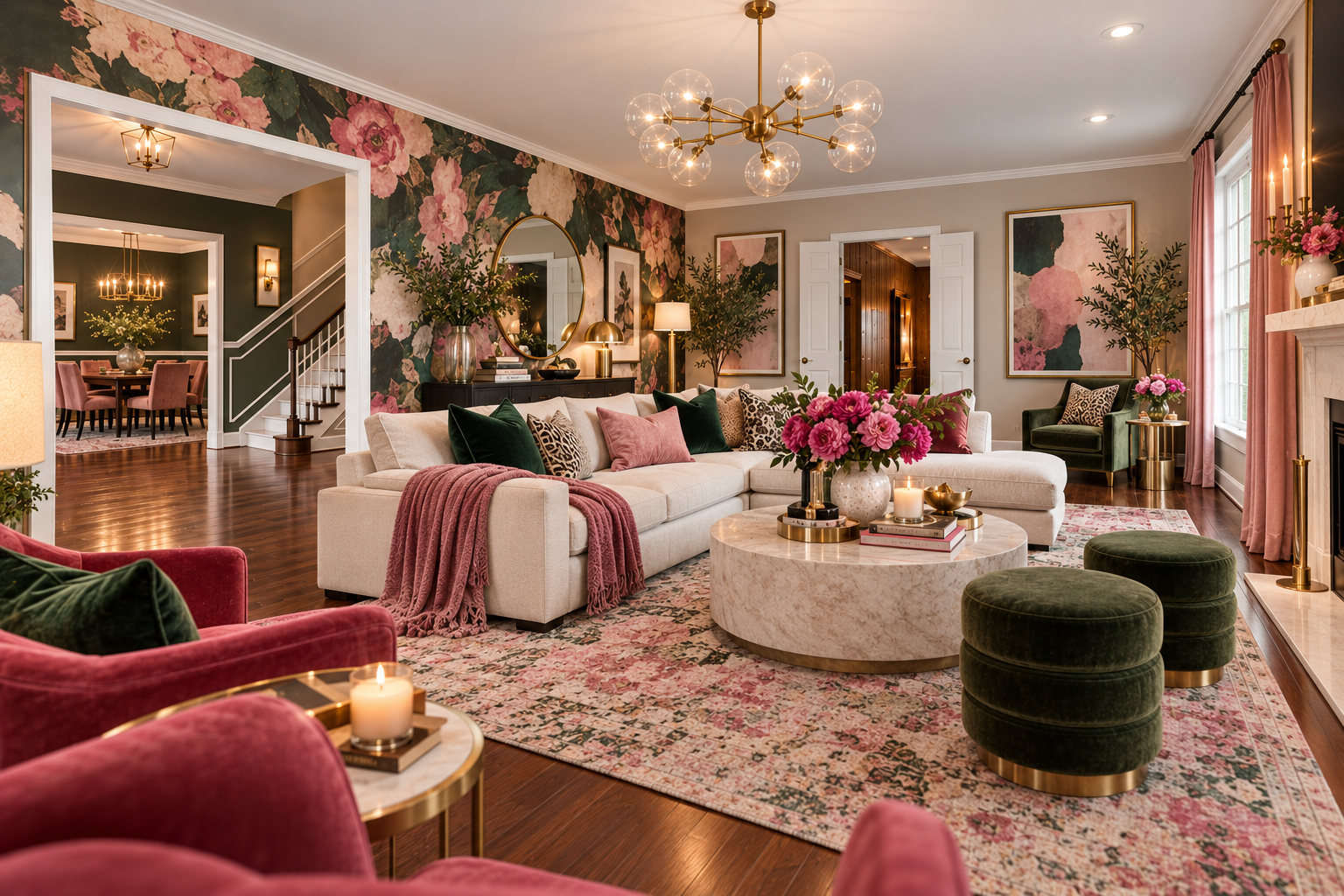
Same room. Same floors. Same windows. Same openings into the adjoining rooms.
But suddenly I could actually see the possibilities.
That is what makes this feature so much fun.
You do not have to be an interior designer. You do not have to know how to use complicated design software. And you do not have to buy a sofa, paint a wall, or move a single piece of furniture just to find out whether an idea might work.
You can experiment first.
Can ChatGPT Really Redesign a Room From a Photo?
Yes — with an important distinction.
ChatGPT can take an existing photograph you upload and create or edit an image based on the changes you describe. OpenAI says ChatGPT Images can edit existing uploaded images simply by having you describe what you want changed. (OpenAI Help Center)
Think of it as visualizing a decorating idea, not getting a precise architectural rendering.
You might ask ChatGPT to show your room as:
- glamorous floral luxe
- modern cottage
- traditional
- coastal
- farmhouse
- contemporary
- French country
- Scandinavian
- cozy English cottage
- transitional
- warm minimalist
- moody and layered
You can also be much more specific.
Maybe you want to keep your hardwood floors but change everything else. Maybe you love your sofa and only want ideas for the walls, rug, lighting, and accessories. Maybe you want to see what your kitchen would look like with green cabinets.
You can tell ChatGPT all of that.
How I Used ChatGPT to Visualize This Room
For this room, I wanted something unapologetically beautiful — bold, feminine, and layered. A little dramatic. Very lived-in luxury.
So I asked for a glamorous floral luxe living room.
I wanted:
- large-scale botanical prints and florals
- rich jewel tones and warm accents
- velvet and softly patterned upholstery
- statement lighting like a chandelier or beautiful lamps
- ornate mirrors, framed art, and layered accessories
- a rug with real presence
- a room that felt collected, elegant, and full of personality
And, most importantly, I wanted the basic room itself to remain recognizable.
That last part matters.
When you are asking ChatGPT to help you visualize your own home, tell it which things you do not want changed.
For example:
Keep the existing hardwood floors, windows, doorways, room proportions, and architectural layout. Redesign the room in a glamorous floral luxe style using large-scale botanical prints, rich jewel tones, velvet upholstery, ornate mirrors, statement lighting, layered rugs, and elegant feminine details.
That gives ChatGPT much more direction than simply saying:
Make this room prettier.
How to Redesign Your Own Room With ChatGPT
You can do this yourself in just a few steps.
OpenAI says ChatGPT Images is available on all tiers and can both generate new images and edit images you upload. (OpenAI Help Center)
Step 1: Take a Good Photograph of Your Room
You do not need professional photography.
Stand far enough back that ChatGPT can see as much of the room as possible.
Try to include:
- walls
- windows
- doors
- flooring
- major furniture
- architectural features
Good lighting helps too.
If you want to redesign an entire room, a wide photograph usually works better than a close-up of one corner.
OpenAI notes that unclear, rotated, highly distorted, or panoramic images can sometimes be harder for ChatGPT to interpret accurately. (OpenAI Help Center)
Step 2: Upload the Photograph to ChatGPT
In ChatGPT, tap or click the + near the message area and choose Add photos & files.
You can also drag an image into ChatGPT on a computer or paste an image you have copied. (OpenAI Help Center)
If you’re brand new to ChatGPT and haven’t set up your account yet, start with my Step-by-Step Beginner Guide to Signing Up for ChatGPT. Come back to this page when you’re ready to upload your first photograph.
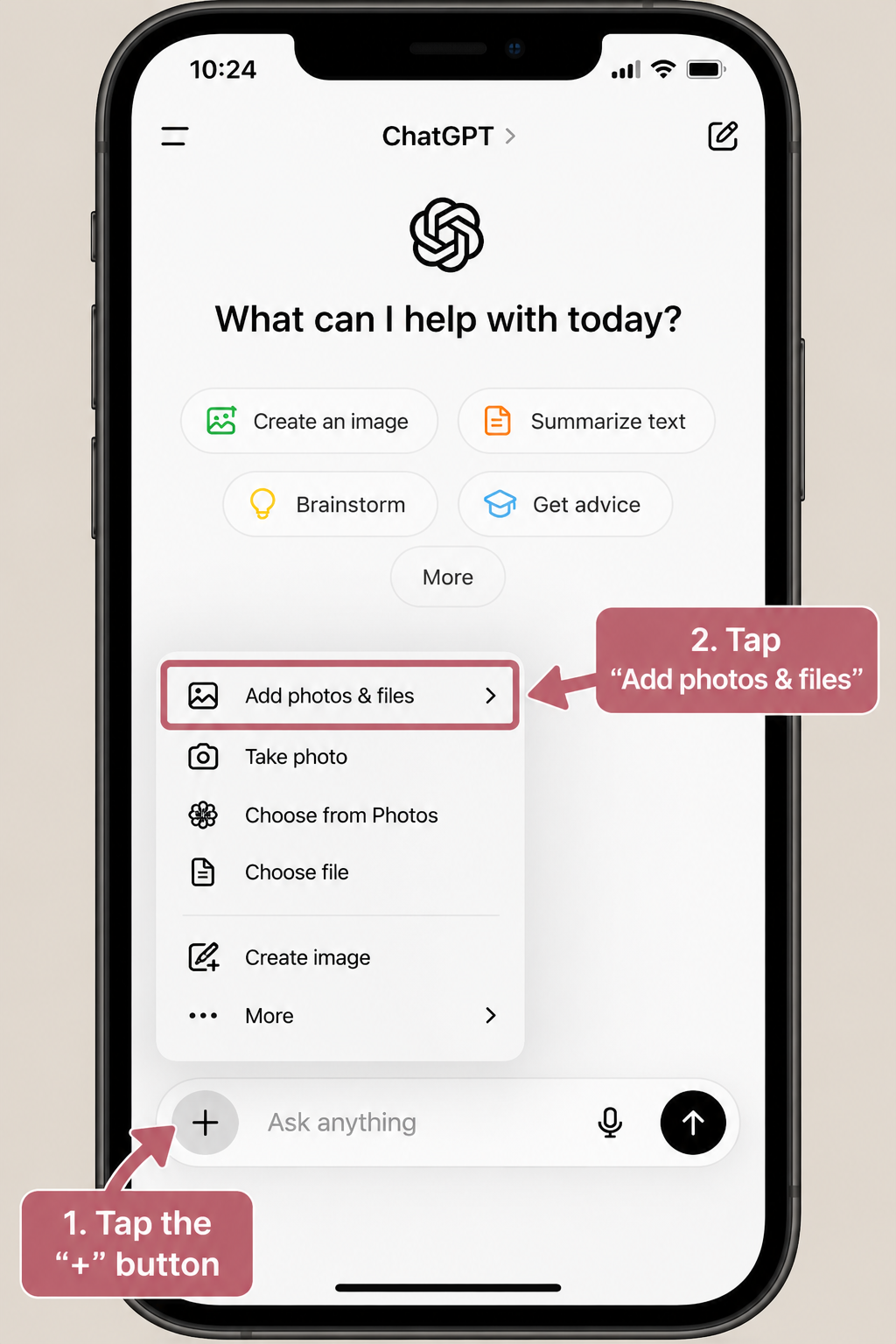
Once the image appears in your conversation, you are ready.
Step 3: Tell ChatGPT What You Want
Now simply describe your vision.
You might say:
Please redesign this room in a modern cottage style. Keep the existing windows, floors, doorways, and basic architecture. Add comfortable cream seating, warm natural wood furniture, a layered neutral rug, greenery, soft lighting, and cozy traditional details.
Or:
Show me what this bedroom could look like in a relaxed coastal style. Keep the bed and flooring, but change the wall color, bedding, curtains, lighting, rug, and accessories.
Or:
I do not want to remodel this kitchen. Show me how I could update it using paint, lighting, stools, rugs, accessories, and window treatments only.
That last sentence can be incredibly useful if you want ideas that are actually within your budget.
Tell ChatGPT What It Must Keep
This is one of the most important tips.
If there are things you do not want changed, say so.
For example:
- Keep the fireplace exactly where it is.
- Do not change the flooring.
- Keep my existing sofa.
- Do not change the size or placement of the windows.
- Keep the kitchen cabinets but change the hardware and wall color.
The more specific you are, the closer the image is likely to come to what you had in mind.
You Can Keep Refining the Room
You do not have to accept the first result.
This is where it gets really fun.
You can say:
- I like this, but make it less formal.
- Make the room warmer.
- Keep everything, but change the rug.
- I want less beige and more soft green.
- Replace the coffee table with something round.
- Make this feel more like an English cottage.
- Show me another version with a smaller budget.
ChatGPT Images supports continuing to edit an image through natural-language instructions, and OpenAI also provides a selection tool when you want to target a particular part of an image. (OpenAI Help Center)
You are essentially having a conversation about the room.
That is what I love about it.
Try Asking for More Than One Version
If you are not sure what your style is, let ChatGPT help you explore.
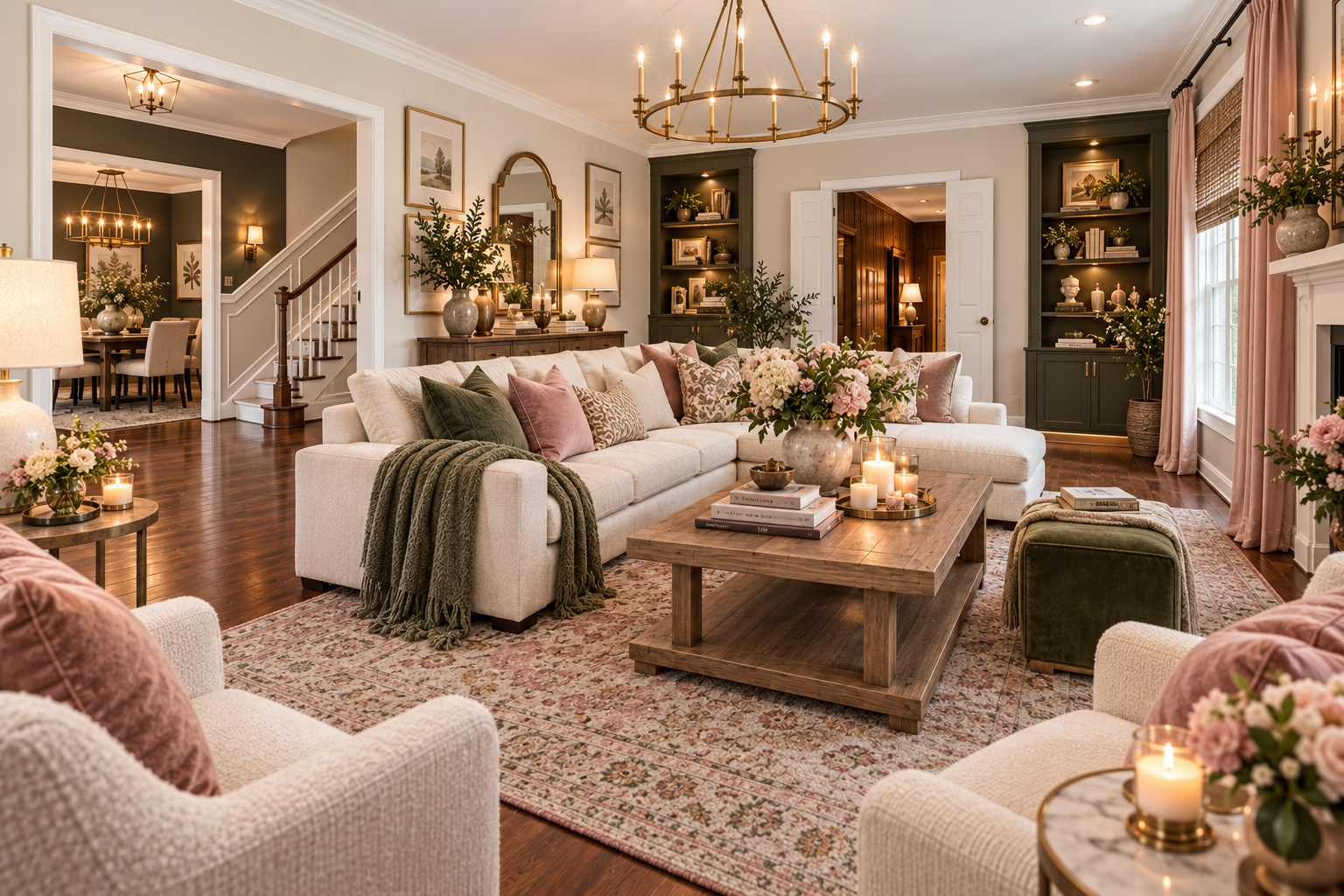
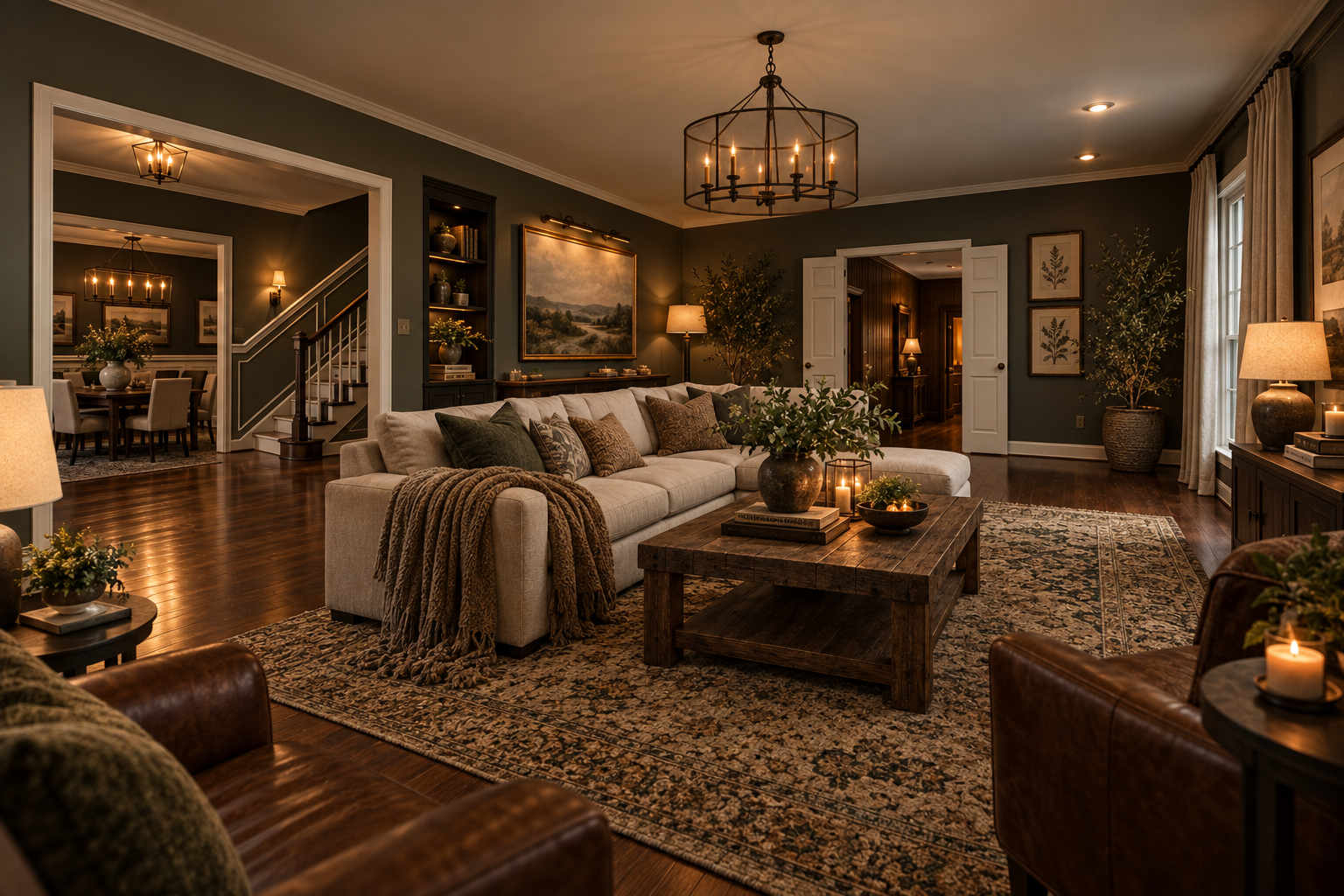
I asked ChatGPT to show me the same empty room in a few different directions, just to see what my house was capable of becoming.
Here is the same living room in a soft, feminine Elegant Blush and Olive style:
And here is the same room in a rich, atmospheric Moody Olive-Toned Retreat style — much darker and cozier:
And a Modern Cottage version, side by side so you can see the transformation from empty to warm and lived-in:
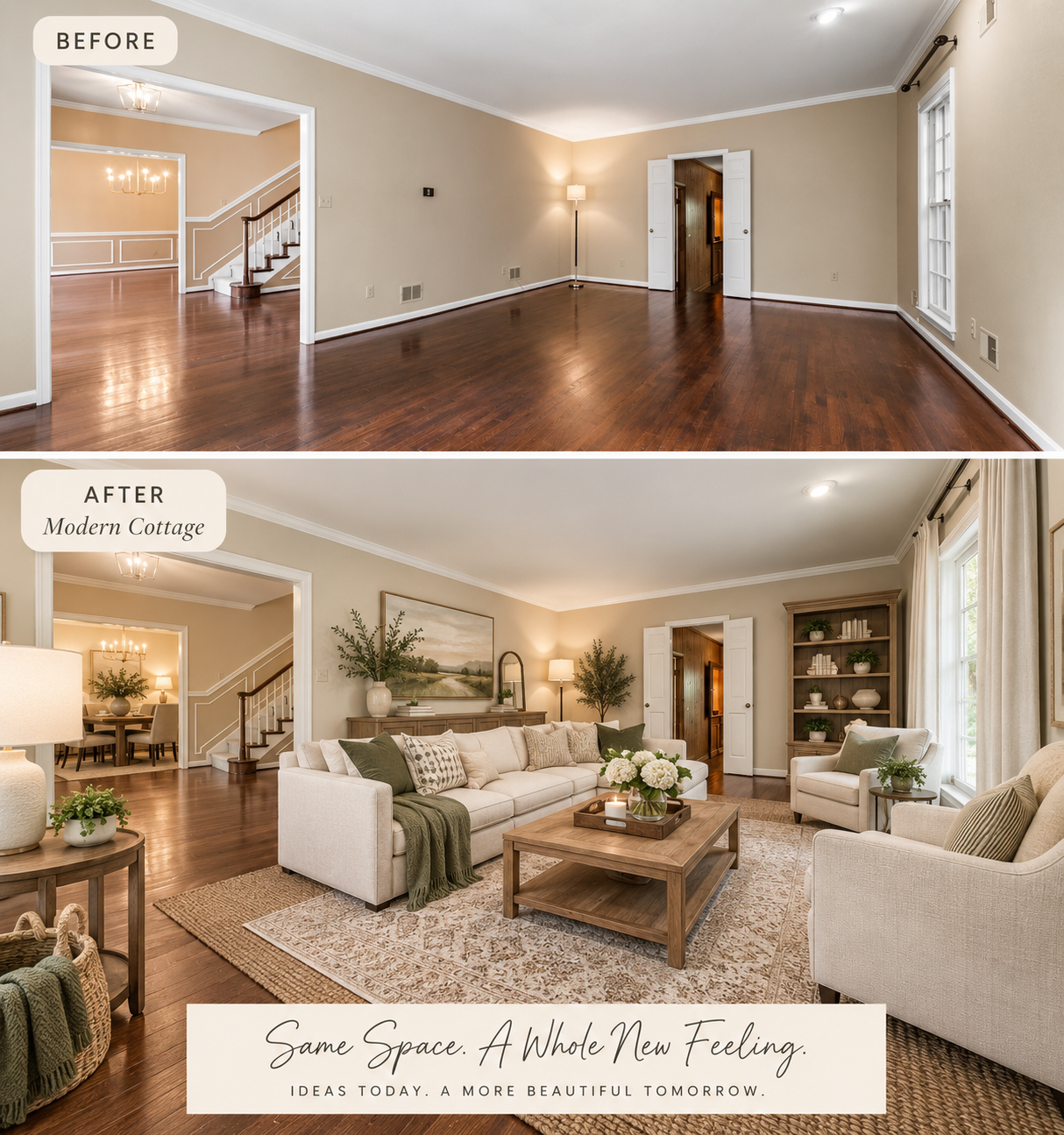
Same room. Four completely different feelings.
You can upload your own photo and ask:
Show me this room in three different directions: glamorous floral luxe, modern cottage, and moody layered.
Or try one style at a time.
You may be surprised by which one you prefer once you actually see it in your own space.
That is very different from looking at a beautiful room on Pinterest.
Pinterest shows you somebody else’s house.
This lets you imagine yours.
You Can Use ChatGPT Before You Spend Money
This may be my favorite practical benefit.
Suppose you are considering:
- painting the room green
- buying a cream sofa
- adding built-in bookcases
- changing your curtains
- replacing a dark rug
- adding wallpaper
- updating your kitchen cabinets
Instead of trying to picture it in your head, ask ChatGPT to show you.
That does not mean the generated image should make the final decision for you.
But it can help you answer:
Do I even like this direction?
And sometimes that is enough to keep you from buying something you would have regretted.
A Few Prompts to Try With Your Own Home
You can copy any of these.
If you want a fuller library of ready-made prompts you can use anywhere in ChatGPT, take a look at my post on Best ChatGPT Prompts for Beginners: 75+ Ready-to-Use Examples. Some of them work beautifully with photos too.
If You Know Your Style
Redesign this room in a glamorous floral luxe style. Keep the architecture and flooring exactly as they are. Use large-scale botanical florals, jewel tones, velvet upholstery, layered patterned rugs, a statement chandelier, ornate mirrors, and elegant feminine accents.
If You Do Not Know Your Style
Look at this room and suggest three decorating styles that would work well with the existing architecture and flooring. Explain each one simply before creating an image.
If You Are on a Budget
Redesign this room without remodeling. Keep the floors, windows, walls, and major furniture. Only use changes I could make with paint, rugs, lighting, curtains, accessories, and furniture placement.
If You Want to Keep Certain Furniture
Redesign this room but keep the sofa, coffee table, and television exactly where they are. Show me how to improve the room around those pieces.
If You Want to Compare Colors
Show me this same room with warm white walls, then soft sage green walls, then a light mushroom beige so I can compare them.
What ChatGPT Room Makeovers Cannot Tell You
This part is important.
The image is a visual concept, not a construction drawing.
ChatGPT may:
- slightly change room dimensions
- move an architectural detail
- make furniture larger or smaller than it would be in real life
- create furniture or decor that does not exist exactly as shown
- interpret portions of the photograph imperfectly
OpenAI specifically notes that image systems can struggle with precise spatial relationships and that image edits may sometimes extend beyond the exact area you intended. (OpenAI Help Center)
So do not use a generated room image to determine:
- exact furniture dimensions
- construction measurements
- electrical placement
- structural changes
- whether something will physically fit
Measure the actual room before buying anything.
Think of your ChatGPT image as inspiration with your own room as the canvas.
An Important Privacy Note
Before uploading photographs of your home, take a quick look at what is visible.
You may want to remove or blur:
- family photographs
- mail with names or addresses
- financial papers
- prescription bottles
- computer screens
- anything else you would prefer not to upload
Your room is the important part.
There is no reason to include private information in the photograph.
My Favorite Part: Seeing Possibility
There is something wonderful about looking at a room you have seen a thousand times and suddenly seeing it differently.
Sometimes we know a room does not feel quite right, but we cannot imagine what would make it better.
That is where this feature shines.
You can experiment. You can be bold. You can try something completely different without spending a dime.
And if you hate it?
Ask ChatGPT to try again.
No paint to cover. No sofa to return. No wallpaper to peel off.
Just another idea.
For beginners, that is one of the things I want you to understand about ChatGPT:
It does not only answer questions.
Sometimes it can help you see what is possible.
And all you need to begin is a photograph and an idea.
— Michelle